The best way to learn Python game programming is to build small games. Each project below is a complete, working game in about 30 to 65 lines of Python. They start very simple and get a little harder each time, so by the end you will have used every basic idea in pygame: the game loop, drawing, the keyboard, the mouse, collisions, score, timers and simple physics.
Every game runs as it is in the free Pygame playground, right in your browser. Click Open in the playground under any project, then press Run. Nothing to install.
Before you start: the game loop
Every pygame program has the same shape. Once you see it, every project on this page will look familiar:
import pygame

pygame.init()
screen = pygame.display.set_mode((600, 400))  # the window
clock = pygame.time.Clock()

running = True
while running:
    # 1. Handle events (keys, mouse, closing the window)
    for event in pygame.event.get():
        if event.type == pygame.QUIT:
            running = False

    # 2. Update: move things, check collisions, keep score

    # 3. Draw: clear the screen, draw everything, show it
    screen.fill((0, 0, 0))
    pygame.display.flip()
    clock.tick(60)  # 60 frames per second

pygame.quit()Two more things to know: the point (0, 0) is the top-left corner, and y grows downwards. Colours are (red, green, blue) from 0 to 255.
| # | Project | Difficulty | You will learn |
|---|---|---|---|
| 1 | Bouncing ball | Very easy | The game loop |
| 2 | Etch-a-Sketch | Very easy | Keyboard input |
| 3 | Catch the falling apples | Easy | Rects, collisions and score |
| 4 | Click the target | Easy | Mouse clicks and timers |
| 5 | Snake | Easy to medium | Grids and lists |
| 6 | Pong (two players) | Medium | Two players on one keyboard |
| 7 | Breakout | Medium | Levels and lives |
| 8 | Flappy-style bird | Medium | Gravity |
| 9 | Space shooter | Medium | Shooting |
| 10 | Whack-a-mole | Easy to medium | Timed events |
1. Bouncing ball
The "hello world" of games: a ball that moves on its own and bounces off the edges of the window.
Difficulty: Very easy · Lines of code: 34
You will learn:
- The game loop: handle events, update, draw, repeat
- Drawing with
pygame.draw.circle - Using
clock.tick(60)to run at 60 frames a second
import pygame

pygame.init()
WIDTH, HEIGHT = 600, 400
screen = pygame.display.set_mode((WIDTH, HEIGHT))
pygame.display.set_caption("Bouncing Ball")
clock = pygame.time.Clock()

x, y = 300, 200     # where the ball is
dx, dy = 5, 4       # how far it moves each frame
radius = 30

running = True
while running:
    for event in pygame.event.get():
        if event.type == pygame.QUIT:
            running = False

    # Move the ball
    x += dx
    y += dy

    # Bounce off the walls
    if x - radius < 0 or x + radius > WIDTH:
        dx = -dx
    if y - radius < 0 or y + radius > HEIGHT:
        dy = -dy

    screen.fill((20, 24, 40))
    pygame.draw.circle(screen, (255, 200, 0), (x, y), radius)
    pygame.display.flip()
    clock.tick(60)

pygame.quit()
How it works: Every frame, the ball moves by dx and dy. When it touches a wall, the matching speed is flipped (dx = -dx), which sends the ball back the other way. screen.fill() wipes the old frame so the ball doesn't leave a trail.
Make it yours:
- Add more balls with a list of
[x, y, dx, dy] - Change the ball's colour every time it bounces
- Remove
screen.fill()and see what happens
2. Etch-a-Sketch
Hold the arrow keys to draw lines, like the classic drawing toy. Space changes the colour and C clears the screen.
Difficulty: Very easy · Lines of code: 45
You will learn:
- Reading held keys with
pygame.key.get_pressed() - Reacting to single key presses with
KEYDOWNevents - Keeping a position inside the window with
maxandmin
import pygame

pygame.init()
WIDTH, HEIGHT = 600, 400
screen = pygame.display.set_mode((WIDTH, HEIGHT))
pygame.display.set_caption("Etch-a-Sketch: arrows to draw, C to clear")
clock = pygame.time.Clock()

x, y = WIDTH // 2, HEIGHT // 2
speed = 3
colors = [(255, 90, 90), (255, 200, 0), (80, 220, 120), (80, 170, 255)]
color_index = 0
screen.fill((245, 240, 230))

running = True
while running:
    for event in pygame.event.get():
        if event.type == pygame.QUIT:
            running = False
        if event.type == pygame.KEYDOWN:
            if event.key == pygame.K_c:
                screen.fill((245, 240, 230))
            if event.key == pygame.K_SPACE:
                color_index = (color_index + 1) % len(colors)

    keys = pygame.key.get_pressed()
    if keys[pygame.K_LEFT]:
        x -= speed
    if keys[pygame.K_RIGHT]:
        x += speed
    if keys[pygame.K_UP]:
        y -= speed
    if keys[pygame.K_DOWN]:
        y += speed

    # Stay inside the window
    x = max(5, min(WIDTH - 5, x))
    y = max(5, min(HEIGHT - 5, y))

    # We never clear the screen, so the dots leave a line
    pygame.draw.circle(screen, colors[color_index], (x, y), 5)
    pygame.display.flip()
    clock.tick(60)

pygame.quit()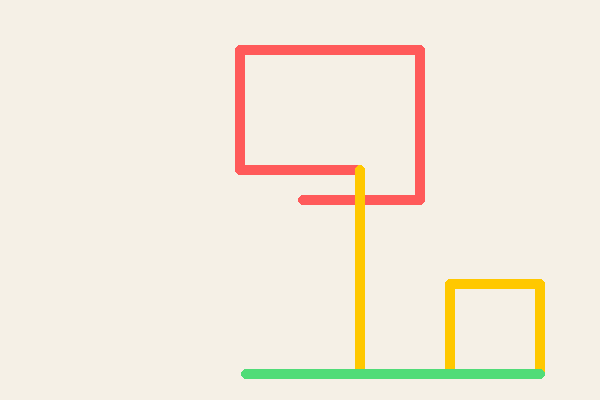
How it works: The difference between the two ways of reading keys is the most useful thing in this project: get_pressed() tells you which keys are held *right now* (perfect for movement), while a KEYDOWN event happens once per press (perfect for actions like changing colour). Because the screen is never cleared, every dot stays and forms a line.
Make it yours:
- Make the pen bigger or smaller with + and -
- Draw with the mouse instead, using
pygame.mouse.get_pos() - Save your drawing with
pygame.image.save(screen, "art.png")
3. Catch the falling apples
Apples fall from the sky and you move a basket with the arrow keys to catch them. Your first real game, with a score!
Difficulty: Easy · Lines of code: 52
You will learn:
- Using
pygame.Rectfor positions and sizes - Collisions with
colliderect - Keeping many objects in a list
- Showing text with
pygame.font
import random
import pygame

pygame.init()
WIDTH, HEIGHT = 600, 400
screen = pygame.display.set_mode((WIDTH, HEIGHT))
pygame.display.set_caption("Catch the Apples")
clock = pygame.time.Clock()
font = pygame.font.Font(None, 36)

basket = pygame.Rect(260, 360, 90, 20)
apples = []
score = 0
missed = 0

running = True
while running:
    for event in pygame.event.get():
        if event.type == pygame.QUIT:
            running = False

    keys = pygame.key.get_pressed()
    if keys[pygame.K_LEFT] and basket.left > 0:
        basket.x -= 7
    if keys[pygame.K_RIGHT] and basket.right < WIDTH:
        basket.x += 7

    # Now and then, a new apple appears at the top
    if random.randint(1, 40) == 1:
        apples.append(pygame.Rect(random.randint(10, WIDTH - 30), -20, 20, 20))

    for apple in apples[:]:
        apple.y += 4
        if apple.colliderect(basket):
            apples.remove(apple)
            score += 1
        elif apple.top > HEIGHT:
            apples.remove(apple)
            missed += 1

    screen.fill((135, 206, 235))
    pygame.draw.rect(screen, (60, 160, 60), (0, 380, WIDTH, 20))
    for apple in apples:
        pygame.draw.circle(screen, (220, 30, 30), apple.center, 10)
        pygame.draw.line(screen, (90, 60, 20), apple.midtop, (apple.centerx + 3, apple.top - 6), 3)
    pygame.draw.rect(screen, (150, 90, 40), basket, border_radius=6)
    text = font.render(f"Caught: {score}   Missed: {missed}", True, (20, 20, 60))
    screen.blit(text, (12, 10))
    pygame.display.flip()
    clock.tick(60)

pygame.quit()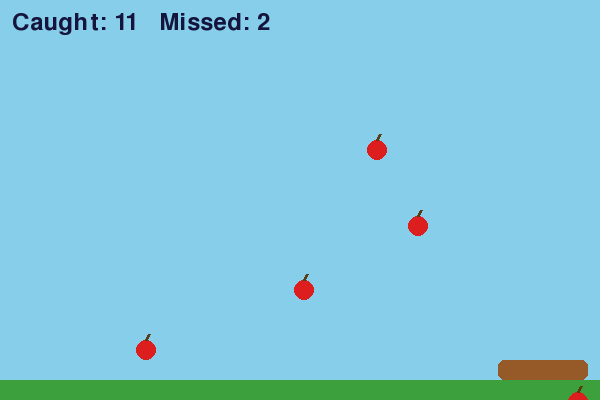
How it works: Each apple is a Rect in the apples list. Every frame they all move down. If an apple touches the basket it is removed and the score goes up; if it falls off the bottom it counts as missed. Looping over apples[:] (a copy) makes it safe to remove items while looping.
Make it yours:
- Make apples fall faster as your score grows
- End the game after 5 misses
- Add golden apples worth 5 points
4. Click the target
An aim trainer: a target appears somewhere random, and you click it as many times as you can in 20 seconds.
Difficulty: Easy · Lines of code: 45
You will learn:
- Mouse clicks with
MOUSEBUTTONDOWNandevent.pos - Checking whether a click is inside a circle
- A countdown timer with
pygame.time.get_ticks()
import random
import pygame

pygame.init()
WIDTH, HEIGHT = 600, 400
screen = pygame.display.set_mode((WIDTH, HEIGHT))
pygame.display.set_caption("Click the Target")
clock = pygame.time.Clock()
font = pygame.font.Font(None, 36)

def new_target():
    return (random.randint(40, WIDTH - 40), random.randint(80, HEIGHT - 40))

target = new_target()
radius = 30
score = 0
start = pygame.time.get_ticks()
game_time = 20  # seconds

running = True
while running:
    seconds_left = game_time - (pygame.time.get_ticks() - start) // 1000

    for event in pygame.event.get():
        if event.type == pygame.QUIT:
            running = False
        if event.type == pygame.MOUSEBUTTONDOWN and seconds_left > 0:
            mx, my = event.pos
            # Inside the circle if the distance is less than the radius
            if (mx - target[0]) ** 2 + (my - target[1]) ** 2 <= radius ** 2:
                score += 1
                target = new_target()

    screen.fill((30, 30, 46))
    if seconds_left > 0:
        for r, color in [(30, (230, 50, 50)), (20, (255, 255, 255)), (10, (230, 50, 50))]:
            pygame.draw.circle(screen, color, target, r)
        info = f"Score: {score}    Time: {seconds_left}"
    else:
        info = f"Time's up! You hit {score} targets."
    screen.blit(font.render(info, True, (255, 255, 255)), (16, 14))
    pygame.display.flip()
    clock.tick(60)

pygame.quit()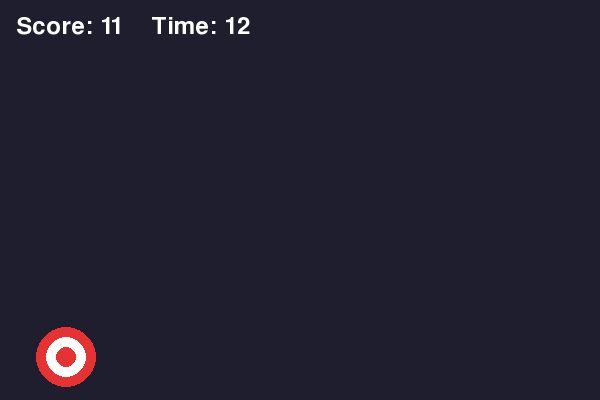
How it works: get_ticks() returns the milliseconds since the game started, so game_time - elapsed // 1000 is the seconds left. A click is a hit when its distance to the centre is less than the radius; comparing squared distances avoids a square root.
Make it yours:
- Make the target smaller after every hit
- Make it move slowly across the screen
- Keep a high score while the game runs
5. Snake
The classic. Steer the snake with the arrow keys, eat the food, and don't run into the walls or yourself.
Difficulty: Easy to medium · Lines of code: 56
You will learn:
- Working on a grid of cells instead of pixels
- Storing the snake as a list of positions
- Controlling game speed with
clock.tick(10)
import random
import pygame

pygame.init()
CELL = 20
COLS, ROWS = 30, 20
screen = pygame.display.set_mode((COLS * CELL, ROWS * CELL))
pygame.display.set_caption("Snake")
clock = pygame.time.Clock()
font = pygame.font.Font(None, 32)

snake = [(10, 10), (9, 10), (8, 10)]   # head first
direction = (1, 0)
food = (20, 10)
score = 0
game_over = False

running = True
while running:
    for event in pygame.event.get():
        if event.type == pygame.QUIT:
            running = False
        if event.type == pygame.KEYDOWN:
            # Don't allow turning straight back into yourself
            if event.key == pygame.K_UP and direction != (0, 1):
                direction = (0, -1)
            if event.key == pygame.K_DOWN and direction != (0, -1):
                direction = (0, 1)
            if event.key == pygame.K_LEFT and direction != (1, 0):
                direction = (-1, 0)
            if event.key == pygame.K_RIGHT and direction != (-1, 0):
                direction = (1, 0)

    if not game_over:
        head = (snake[0][0] + direction[0], snake[0][1] + direction[1])
        if head in snake or not (0 <= head[0] < COLS and 0 <= head[1] < ROWS):
            game_over = True
        else:
            snake.insert(0, head)
            if head == food:
                score += 1
                while food in snake:
                    food = (random.randrange(COLS), random.randrange(ROWS))
            else:
                snake.pop()   # no food: the tail moves too

    screen.fill((15, 20, 15))
    pygame.draw.rect(screen, (230, 60, 60), (food[0] * CELL, food[1] * CELL, CELL, CELL), border_radius=6)
    for x, y in snake:
        pygame.draw.rect(screen, (90, 220, 90), (x * CELL + 1, y * CELL + 1, CELL - 2, CELL - 2), border_radius=4)
    text = "Game over!" if game_over else f"Score: {score}"
    screen.blit(font.render(text, True, (255, 255, 255)), (10, 8))
    pygame.display.flip()
    clock.tick(10)   # the snake moves 10 times a second

pygame.quit()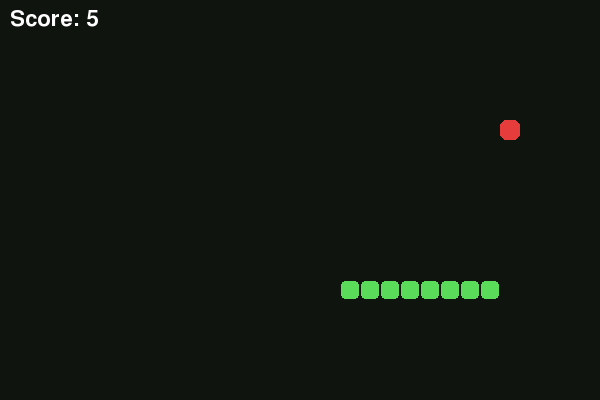
How it works: The snake is a list of cells with the head first. Each step a new head is added in the current direction. If the head lands on food the tail stays, so the snake grows; otherwise the last cell is removed with pop(), so the snake simply moves.
Make it yours:
- Speed up a little every time it eats
- Let the snake wrap around the edges instead of dying
- Add a "press Space to restart" screen
6. Pong (two players)
Two paddles and a ball: the left player uses W and S, the right player uses the Up and Down arrows. Miss the ball and the other player scores.
Difficulty: Medium · Lines of code: 59
You will learn:
- Two players on one keyboard
- Bouncing a ball off moving paddles
- Keeping and drawing two scores
import pygame

pygame.init()
WIDTH, HEIGHT = 600, 400
screen = pygame.display.set_mode((WIDTH, HEIGHT))
pygame.display.set_caption("Pong: W/S and Up/Down")
clock = pygame.time.Clock()
font = pygame.font.Font(None, 60)

left = pygame.Rect(20, 160, 12, 80)
right = pygame.Rect(WIDTH - 32, 160, 12, 80)
ball = pygame.Rect(290, 190, 18, 18)
speed_x, speed_y = 5, 4
left_score = right_score = 0

running = True
while running:
    for event in pygame.event.get():
        if event.type == pygame.QUIT:
            running = False

    keys = pygame.key.get_pressed()
    if keys[pygame.K_w] and left.top > 0:
        left.y -= 6
    if keys[pygame.K_s] and left.bottom < HEIGHT:
        left.y += 6
    if keys[pygame.K_UP] and right.top > 0:
        right.y -= 6
    if keys[pygame.K_DOWN] and right.bottom < HEIGHT:
        right.y += 6

    ball.x += speed_x
    ball.y += speed_y
    if ball.top <= 0 or ball.bottom >= HEIGHT:
        speed_y = -speed_y
    if ball.colliderect(left) and speed_x < 0:
        speed_x = -speed_x
    if ball.colliderect(right) and speed_x > 0:
        speed_x = -speed_x

    # A point when the ball leaves the screen
    if ball.left < 0:
        right_score += 1
        ball.center = (WIDTH // 2, HEIGHT // 2)
    if ball.right > WIDTH:
        left_score += 1
        ball.center = (WIDTH // 2, HEIGHT // 2)

    screen.fill((10, 10, 20))
    pygame.draw.line(screen, (60, 60, 80), (WIDTH // 2, 0), (WIDTH // 2, HEIGHT), 2)
    pygame.draw.rect(screen, (255, 255, 255), left)
    pygame.draw.rect(screen, (255, 255, 255), right)
    pygame.draw.ellipse(screen, (255, 210, 0), ball)
    screen.blit(font.render(str(left_score), True, (200, 200, 200)), (WIDTH // 2 - 60, 20))
    screen.blit(font.render(str(right_score), True, (200, 200, 200)), (WIDTH // 2 + 40, 20))
    pygame.display.flip()
    clock.tick(60)

pygame.quit()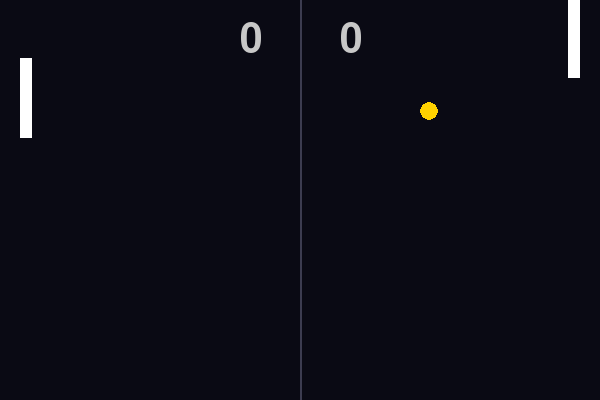
How it works: The ball's direction flips when it hits the top or bottom, or one of the paddles. The extra check and speed_x < 0 makes sure the ball only bounces off the left paddle while it is moving left, so it can't get stuck inside a paddle.
Make it yours:
- Make the right paddle follow the ball, for a one-player game against the computer
- Speed the ball up a little on every hit
- First to 5 points wins
7. Breakout
Bounce the ball off your paddle to break all the bricks. The paddle follows your mouse.
Difficulty: Medium · Lines of code: 64
You will learn:
- Building a level with nested loops
- Removing objects when they are hit
- Lives, winning and losing
import pygame

pygame.init()
WIDTH, HEIGHT = 600, 400
screen = pygame.display.set_mode((WIDTH, HEIGHT))
pygame.display.set_caption("Breakout")
clock = pygame.time.Clock()
font = pygame.font.Font(None, 32)

paddle = pygame.Rect(250, 370, 100, 12)
ball = pygame.Rect(292, 300, 14, 14)
speed_x, speed_y = 4, -4
colors = [(240, 80, 80), (245, 160, 60), (240, 220, 70), (90, 200, 110), (80, 160, 240)]
bricks = []
for row in range(5):
    for col in range(10):
        bricks.append((pygame.Rect(col * 60 + 2, row * 22 + 50, 56, 18), colors[row]))
lives = 3

running = True
while running:
    for event in pygame.event.get():
        if event.type == pygame.QUIT:
            running = False

    # The paddle follows the mouse
    paddle.centerx = pygame.mouse.get_pos()[0]

    ball.x += speed_x
    ball.y += speed_y
    if ball.left <= 0 or ball.right >= WIDTH:
        speed_x = -speed_x
    if ball.top <= 0:
        speed_y = -speed_y
    if ball.colliderect(paddle) and speed_y > 0:
        speed_y = -speed_y
    if ball.top > HEIGHT:
        lives -= 1
        ball.center = (300, 300)
        speed_y = -4

    for brick in bricks[:]:
        if ball.colliderect(brick[0]):
            bricks.remove(brick)
            speed_y = -speed_y
            break

    screen.fill((18, 18, 30))
    for rect, color in bricks:
        pygame.draw.rect(screen, color, rect, border_radius=3)
    pygame.draw.rect(screen, (230, 230, 240), paddle, border_radius=6)
    pygame.draw.ellipse(screen, (255, 255, 255), ball)
    if not bricks:
        message = "You win!"
    elif lives <= 0:
        message = "Game over"
        speed_x = speed_y = 0
    else:
        message = f"Lives: {lives}   Bricks left: {len(bricks)}"
    screen.blit(font.render(message, True, (220, 220, 220)), (12, 14))
    pygame.display.flip()
    clock.tick(60)

pygame.quit()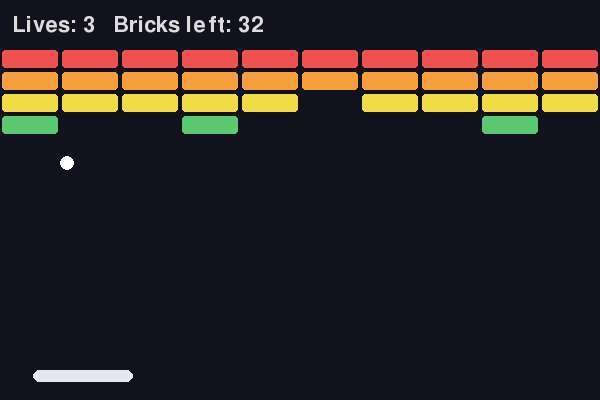
How it works: The bricks are made by two loops, one for rows and one for columns, and each brick remembers its colour. When the ball touches a brick, the brick is removed and the ball bounces back. Falling below the paddle costs a life.
Make it yours:
- Give the top rows more points
- Bricks that need two hits
- Change the ball's angle depending on where it hits the paddle
8. Flappy-style bird
Press Space to flap and fly through the gaps between the pipes. Gravity pulls you down all the time.
Difficulty: Medium · Lines of code: 62
You will learn:
- Simple physics: gravity and velocity
- Spawning obstacles at regular intervals
- Restarting a game
import random
import pygame

pygame.init()
WIDTH, HEIGHT = 600, 400
screen = pygame.display.set_mode((WIDTH, HEIGHT))
pygame.display.set_caption("Flappy: press Space")
clock = pygame.time.Clock()
font = pygame.font.Font(None, 40)

bird_y = 200
velocity = 0
gravity = 0.4
pipes = []        # each pipe is [x, height of the gap's top]
gap = 130
score = 0
alive = True
frame = 0

running = True
while running:
    for event in pygame.event.get():
        if event.type == pygame.QUIT:
            running = False
        if event.type == pygame.KEYDOWN and event.key == pygame.K_SPACE:
            if alive:
                velocity = -7      # flap!
            else:                  # start again
                bird_y, velocity, pipes, score, alive = 200, 0, [], 0, True

    if alive:
        velocity += gravity
        bird_y += velocity
        frame += 1
        if frame % 90 == 0:
            pipes.append([WIDTH, random.randint(50, HEIGHT - gap - 50)])
        for pipe in pipes:
            pipe[0] -= 3
        if pipes and pipes[0][0] < -60:
            pipes.pop(0)
            score += 1

    bird = pygame.Rect(100, bird_y, 30, 24)
    screen.fill((110, 195, 240))
    for x, top in pipes:
        top_pipe = pygame.Rect(x, 0, 60, top)
        bottom_pipe = pygame.Rect(x, top + gap, 60, HEIGHT)
        pygame.draw.rect(screen, (70, 180, 70), top_pipe)
        pygame.draw.rect(screen, (70, 180, 70), bottom_pipe)
        if bird.colliderect(top_pipe) or bird.colliderect(bottom_pipe):
            alive = False
    if bird.bottom > HEIGHT or bird.top < 0:
        alive = False

    pygame.draw.ellipse(screen, (255, 220, 0), bird)
    pygame.draw.circle(screen, (0, 0, 0), (bird.x + 22, bird.y + 8), 3)
    text = f"Score: {score}" if alive else "Ouch! Space to retry"
    screen.blit(font.render(text, True, (255, 255, 255)), (12, 10))
    pygame.display.flip()
    clock.tick(60)

pygame.quit()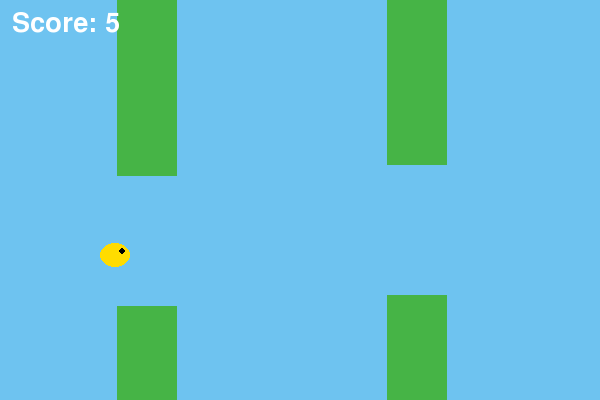
How it works: Gravity is just a number added to the bird's speed every frame, and the speed is added to its height. A flap sets the speed to a negative number, so the bird jumps up and then falls again. A new pipe appears every 90 frames at a random height.
Make it yours:
- Make the gap smaller as the score grows
- Tilt the bird up when it flaps and down when it falls
- Show a best score
9. Space shooter
Move your ship with the arrow keys and press Space to shoot the alien ships before they get past you.
Difficulty: Medium · Lines of code: 63
You will learn:
- Shooting: creating bullets on a key press
- Checking collisions between two lists
- A simple starfield background
import random
import pygame

pygame.init()
WIDTH, HEIGHT = 600, 400
screen = pygame.display.set_mode((WIDTH, HEIGHT))
pygame.display.set_caption("Space Shooter")
clock = pygame.time.Clock()
font = pygame.font.Font(None, 32)

ship = pygame.Rect(280, 350, 40, 30)
bullets = []
enemies = []
stars = [(random.randrange(WIDTH), random.randrange(HEIGHT)) for _ in range(60)]
score = 0

running = True
while running:
    for event in pygame.event.get():
        if event.type == pygame.QUIT:
            running = False
        if event.type == pygame.KEYDOWN and event.key == pygame.K_SPACE:
            bullets.append(pygame.Rect(ship.centerx - 2, ship.top - 10, 4, 12))

    keys = pygame.key.get_pressed()
    if keys[pygame.K_LEFT] and ship.left > 0:
        ship.x -= 6
    if keys[pygame.K_RIGHT] and ship.right < WIDTH:
        ship.x += 6

    if random.randint(1, 45) == 1:
        enemies.append(pygame.Rect(random.randint(0, WIDTH - 36), -30, 36, 24))

    for bullet in bullets[:]:
        bullet.y -= 9
        if bullet.bottom < 0:
            bullets.remove(bullet)
    for enemy in enemies[:]:
        enemy.y += 2
        if enemy.top > HEIGHT:
            enemies.remove(enemy)
            continue
        for bullet in bullets[:]:
            if enemy.colliderect(bullet):
                enemies.remove(enemy)
                bullets.remove(bullet)
                score += 10
                break

    screen.fill((5, 5, 20))
    for x, y in stars:
        screen.set_at((x, y), (200, 200, 255))
    for enemy in enemies:
        pygame.draw.rect(screen, (230, 70, 200), enemy, border_radius=8)
        pygame.draw.circle(screen, (255, 255, 255), (enemy.centerx, enemy.centery), 5)
    for bullet in bullets:
        pygame.draw.rect(screen, (255, 240, 120), bullet)
    pygame.draw.polygon(screen, (80, 200, 255), [ship.midtop, ship.bottomleft, ship.bottomright])
    screen.blit(font.render(f"Score: {score}", True, (255, 255, 255)), (12, 10))
    pygame.display.flip()
    clock.tick(60)

pygame.quit()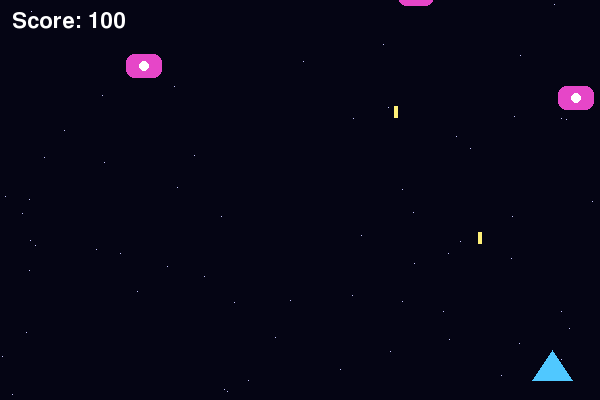
How it works: Bullets and enemies are both lists of Rects. Each frame bullets move up and enemies move down, and every enemy checks every bullet. When they touch, both disappear and you score 10 points.
Make it yours:
- Lose a life when an enemy reaches the bottom
- Let enemies shoot back
- Hold Space for automatic fire, with a short cooldown
10. Whack-a-mole
A mole pops out of a random hole every second. Click it before it hides again!
Difficulty: Easy to medium · Lines of code: 51
You will learn:
- Making a grid of positions with a list comprehension
- Doing something every N milliseconds
- Drawing a character from simple shapes
import random
import pygame

pygame.init()
WIDTH, HEIGHT = 600, 400
screen = pygame.display.set_mode((WIDTH, HEIGHT))
pygame.display.set_caption("Whack-a-Mole")
clock = pygame.time.Clock()
font = pygame.font.Font(None, 36)

# Nine holes in a 3 x 3 grid
holes = [(150 + col * 150, 130 + row * 100) for row in range(3) for col in range(3)]
mole = random.choice(holes)
last_move = pygame.time.get_ticks()
score = 0
misses = 0

running = True
while running:
    now = pygame.time.get_ticks()
    for event in pygame.event.get():
        if event.type == pygame.QUIT:
            running = False
        if event.type == pygame.MOUSEBUTTONDOWN:
            mx, my = event.pos
            if abs(mx - mole[0]) < 40 and abs(my - mole[1]) < 40:
                score += 1
                mole = random.choice(holes)
                last_move = now
            else:
                misses += 1

    # The mole jumps to another hole every 0.9 seconds
    if now - last_move > 900:
        mole = random.choice(holes)
        last_move = now

    screen.fill((110, 180, 80))
    for x, y in holes:
        pygame.draw.ellipse(screen, (60, 40, 25), (x - 45, y - 5, 90, 35))
    mx, my = mole
    pygame.draw.ellipse(screen, (140, 90, 50), (mx - 30, my - 45, 60, 60))
    pygame.draw.circle(screen, (0, 0, 0), (mx - 10, my - 25), 4)
    pygame.draw.circle(screen, (0, 0, 0), (mx + 10, my - 25), 4)
    pygame.draw.circle(screen, (240, 120, 140), (mx, my - 15), 6)
    pygame.draw.ellipse(screen, (60, 40, 25), (mx - 45, my + 5, 90, 25))  # front of the hole
    screen.blit(font.render(f"Whacked: {score}   Misses: {misses}", True, (255, 255, 255)), (16, 14))
    pygame.display.flip()
    clock.tick(60)

pygame.quit()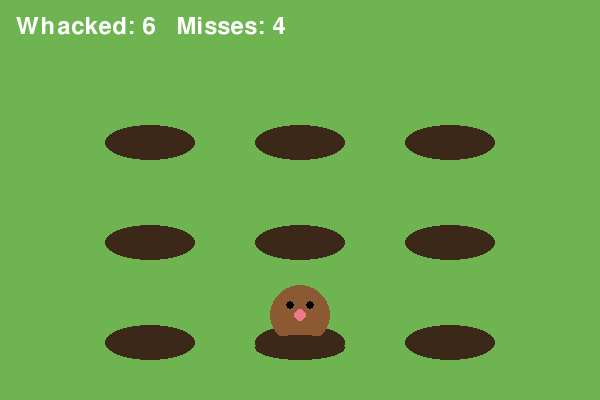
How it works: The nine holes come from one list comprehension. The game remembers when the mole last moved; once 900 ms have passed it jumps to a new random hole. The front edge of the hole is drawn after the mole, so the mole looks like it is coming out of the ground.
Make it yours:
- Speed up the mole as the score grows
- Add a 30 second timer
- Add a "bomb" you must not click
Tips for every project
- Change one thing at a time. Change a number, run the game, see what happens. That is how game programmers work too.
- Use `pygame.Rect`. It stores position and size, moves easily (
rect.x += 5) and checks collisions for you (rect.colliderect(other)). - Remove from a copy. When you remove items from a list while looping, loop over
my_list[:]. - `get_pressed()` for moving, `KEYDOWN` for actions. Held keys move things smoothly; a single press is better for jumping, shooting or changing something.
- Always call `clock.tick(60)`. Without it the game runs as fast as your computer can go, which is different on every computer.
- Don't name your file `pygame.py`. Python would import your own file instead of pygame.
What next?
Once you have finished a few of these, try combining ideas: the space shooter with the apple game's falling speed, or Snake with Breakout's levels. Then try a bigger project like the Ramayana: Battle of Lanka game on our projects page.
You can build and share all of these in the Pygame playground. And if you prefer drawing to games, our Python Turtle cheat sheet covers every turtle command with pictures.